1
Single PDF Export
Combine selected WordPress posts, pages or public post types into one clean PDF document.
Posts to PDF Exporter helps administrators create professional PDF files from WordPress posts, pages and public post types directly from the backend. Export everything into one PDF or generate one PDF per post with progress tracking.
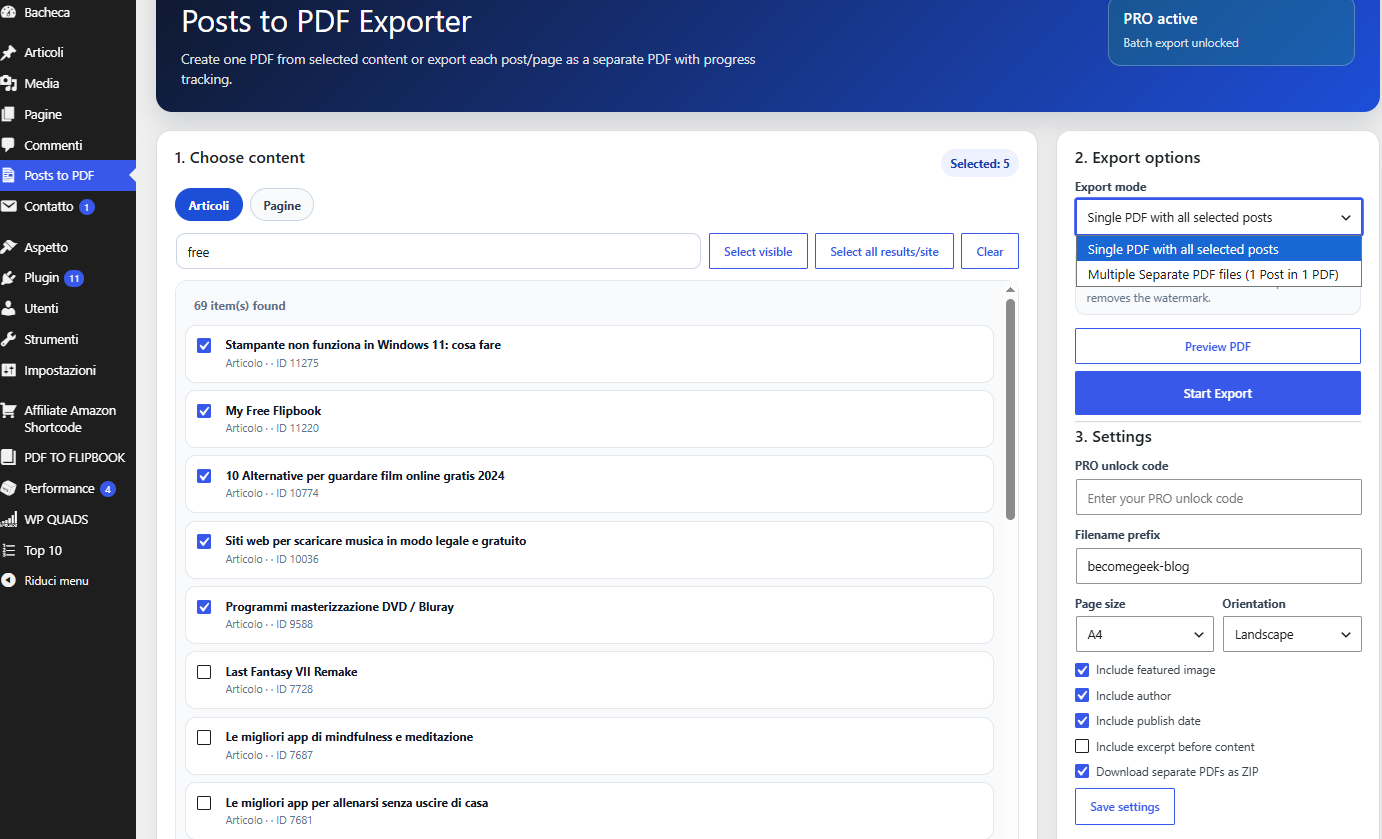
Select content, preview the result, customize PDF settings and export posts or pages without leaving the WordPress admin area.
Combine selected WordPress posts, pages or public post types into one clean PDF document.
Generate one PDF file for each post or page. Perfect for large websites, archives, reports and backups.
When supported by the server, separate PDFs are packaged into a single ZIP file to avoid browser multiple-download warnings.
Large exports are easier to follow with a progress popup. Multiple PDF exports can be cancelled during processing.
Choose page size, orientation, filename prefix and whether to include featured image, author, date and excerpt.
Select all posts from a site or search result, remove watermark and unlock advanced batch export workflows.
From content selection to PDF download, the export process is designed to be simple for small jobs and safer for larger batches.
Select posts, pages or public post types from the admin interface.
Create one single PDF or multiple separate PDF files, one post per PDF.
Set filename prefix, page size, orientation and content metadata options.
Download the final PDF or a ZIP archive containing all separate PDF files.
The plugin adds a clear export dashboard with content selection, search, export mode, preview, settings and PRO unlock status.
Start with the free WordPress plugin, then upgrade when you need full-site export, watermark removal and advanced batch features.
Best for small exports and testing the PDF workflow on your WordPress site.
Designed for administrators who need to export many posts, pages or full search results.
Useful details about PDF generation, ZIP export, limits and browser downloads.
Yes. Use “Multiple Separate PDF files (1 Post in 1 PDF)” to generate a separate PDF for each selected post or page.
Yes, if your server supports ZipArchive. If not, ZIP mode is disabled and files are downloaded individually.
The Free version allows up to 20 selected items for Single PDF export and up to 20 selected items for Multiple Separate PDF files.
Yes. The Free version adds a watermark to exported PDFs. The PRO version removes the watermark.
Yes, this is a PRO feature. You can select all posts from the site or all posts from the current search result.
The final download location is controlled by the browser and operating system. WordPress cannot directly choose the user's local folder.
Download the free plugin from WordPress.org or upgrade to PRO to unlock full-site batch export, watermark removal and advanced PDF workflows.